I’ve been using Claude Code for about a week or 2 now, and while I still basically have no idea what I’m doing and have just been throwing everything at the wall and seeing what sticks, I thought it’d be pretty helpful to document what I’ve been learning and what kind of workflow I’ve been working with.
Claude Code is an agentic coding tool based in the terminal. Its main draw is that it “understands” (or rather greps through) your codebase, then directly edits / adds to your code (like with Cursor) and can also handle git workflows.
General Workflow Overview
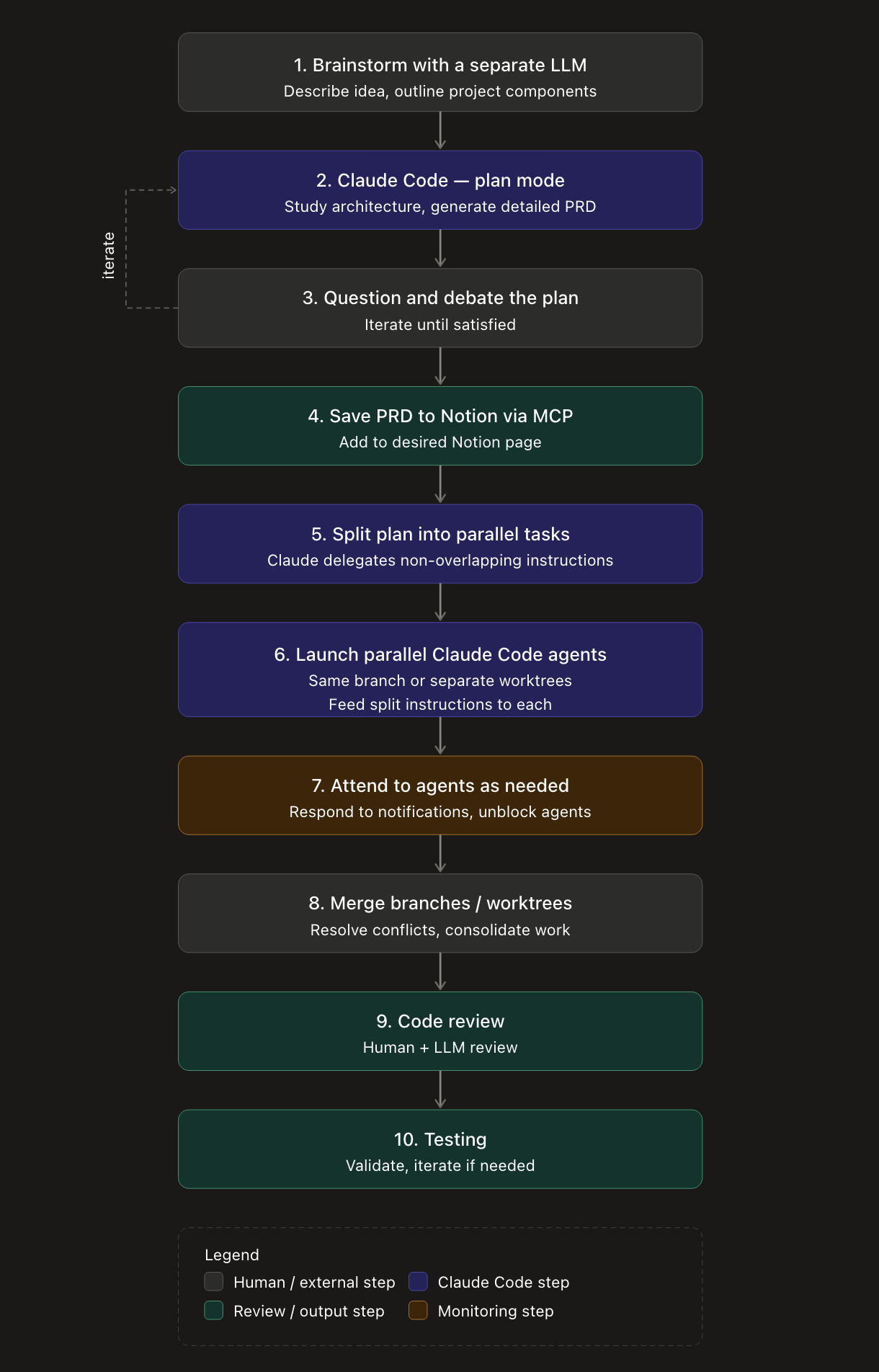
My Approach
Planning
The way I approach using Claude Code is to use it as mostly a planner, sometimes a chore-executor and (when I’m really satisfied with the plan) a really fast coding partner. I find that asking it to generate code too early on just leads to a lot of problems, a lot of drift from what you actually had in mind, and thus way more back-and-forth that burns through your tokens when you could’ve just planned properly in the beginning.
HITL Code Reviews
While Claude Code is great for turning my ideas into a tangible MVP really quickly, it is by no means able to write code like an actual Senior Engineer would. As such, I like to review all the changes Claude has made just to make sure that 1. I understand what it’s doing, and 2. the code isn’t horrible and isn’t going to break anything. Of course, it does help to ask a separate instance of Claude to review the code alongside me.
Managing Context
Using markdown files to context engineer for Claude is so useful. For example, utilising CLAUDE.md to establish rules and general practices you want it to follow keeps its behaviour consistent and within what you’re asking of it. You can also describe the system architecture (by its various components, not one gigantic file) to avoid having to explain how things over and over again.
This allows me to comfortably boot up new sessions of claude code without worrying about explaining things a billion times over, and I like to work like this as I feel (and I’m pretty sure it’s a fact) that LLM performance degrades a LOT when the context window gets bloated. The LLM also forgets earlier instructions and information / constraints, so in general I just prefer to keep my agents’ memory nice and fresh.
Token Limit
The previous section in turn also helps to prevent burning through my token limit too quickly. I also tend to split my work that requires Claude Code into 2 parts, to be completed in the first and second half of the day - before and after token limit resets.
Parallel Agents
I don’t like having one agent handle multiple tasks on its own, because not only is this slow, but the agent is more prone to screwing things up along the way. As such, I like that Claude Code is able to use git worktree, allowing me to run focused individual agents working on non-overlapping tasks in parallel. I run each of these instances in a separate pane in tmux.
Well, I still have a lot to look into and learn about, and I am so sure that this workflow could be improved a LOT, but at the same time I don’t think there is one universally ideal way in which you should be utilising this tool. There are apparently a lot of useful plugins out there, so I will probably be looking into these next.