PROVIDER PATTERN
- https://www.patterns.dev/vanilla/provider-pattern/
- https://medium.com/@haidarally/the-provider-pattern-a-comprehensive-guide-with-c-examples-54c4a5cc0fd7
- https://medium.com/@nikitinsn6/demystifying-the-provider-pattern-implementation-and-best-use-cases-fd04c2eaa0c2
What is the Provider Pattern?
- The Provider Pattern is a state management pattern that provides a way to manage and share state between different components of an application. It is based on the concept of Inversion of Control (IoC), where the control of the application is passed from the components to the Provider.
- abstracts away the underlying implementation details by providing a standard interface for accessing a resource or service.
- The Provider:
- acts as a central repository for the application state and provides a way to access and update the state
- the components of the application can then use the Provider to access the state and update it as needed.
- With the Provider Pattern, we can make data available to multiple components.
- Rather than passing that data down each layer through props, we can wrap all components in a
Provider. - A Provider is a higher order component provided to us by the
Contextobject. We can create a Context object, using thecreateContextmethod that React provides for us.
- Rather than passing that data down each layer through props, we can wrap all components in a
Example in React:
-
We want the user to be able to switch between lightmode and darkmode, by toggling the switch.
-
When the user switches from dark- to lightmode and vice versa, the background color and text color should change!
-
Instead of passing the current theme value down to each component, we can wrap the components in a
ThemeProvider, and pass the current theme colors to the provider. -
Since the
ToggleandListcomponents are both wrapped within theThemeContextprovider, we have access to the valuesthemeandtoggleThemethat are passed as avalueto the provider.export const ThemeContext = React.createContext(); const themes = { light: { background: "#fff", color: "#000", }, dark: { background: "#171717", color: "#fff", }, }; export default function App() { const [theme, setTheme] = useState("dark"); function toggleTheme() { setTheme(theme === "light" ? "dark" : "light"); } const providerValue = { theme: themes[theme], toggleTheme, }; return ( <div className={`App theme-${theme}`}> <ThemeContext.Provider value={providerValue}> <Toggle /> <List /> </ThemeContext.Provider> </div> ); }import React, { useContext } from "react"; import { ThemeContext } from "./App"; export default function Toggle() { const theme = useContext(ThemeContext); return ( <label className="switch"> <input type="checkbox" onClick={theme.toggleTheme} /> <span className="slider round" /> </label> ); } -
Hooks:
-
We can create a hook to provide context to components. Instead of having to import
useContextand the Context in each component, we can use a hook that returns the context we need.function useThemeContext() { const theme = useContext(ThemeContext); if (!theme) { throw new Error("useThemeContext must be used within ThemeProvider"); } return theme; } -
Instead of wrapping the components directly with the
ThemeContext.Providercomponent, we can create a HOC that wraps the component to provide its values. This way, we can separate the context logic from the rendering components, which improves the reusability of the provider.function ThemeProvider({ children }) { const [theme, setTheme] = useState("dark"); function toggleTheme() { setTheme(theme === "light" ? "dark" : "light"); } const providerValue = { theme: themes[theme], toggleTheme, }; return ( <ThemeContext.Provider value={providerValue}> {children} </ThemeContext.Provider> ); } export default function App() { return ( <div className={`App theme-${theme}`}> <ThemeProvider> <Toggle /> <List /> </ThemeProvider> </div> ); } -
Each component that needs to have access to the
ThemeContext, can now simply use theuseThemeContexthook. -
By creating hooks for the different contexts, it’s easy to separate the providers’s logic from the components that render the data.
export default function TextBox() {
  const theme = useThemeContext();

  return <li style={theme.theme}>...</li>;
}
-
Benefits 👍
The Provider Pattern offers several benefits for software development:
- Easier state management: The Provider Pattern provides a centralized way to manage and share state between different components of an application.
- Better performance: By using the Provider Pattern, you can reduce the number of re-renders in your application, leading to better performance.
- Code reusability: The Provider Pattern makes it possible to reuse code across multiple components of an application.
- Simplified testing: The Provider Pattern makes it easier to test the state management logic of your application.
Where is the Provider Pattern best applied?
- The Provider Pattern is best applied in large-scale applications with complex state management requirements. It is particularly useful in applications with multiple components that need to access and update the same state.
- The Provider Pattern is also a good choice for applications that require high performance, as it can help to reduce the number of re-renders in the application.
Configuration Management
- The final step in implementing the Provider pattern is to manage the configurations so that the program knows which provider to use.
- A configuration file, such as an XML file, that specifies the type of provider to use is a common approach.
ADAPTER PATTERN
- https://www.geeksforgeeks.org/system-design/adapter-pattern/
- https://medium.com/@murilolivorato/the-adapter-pattern-in-php-from-code-chaos-to-clean-architecture-7a7fd96c815e
- https://medium.com/javascript-in-plain-english/the-adapter-pattern-in-typescript-a-guide-for-practical-developers-b0bb3a53b6c2
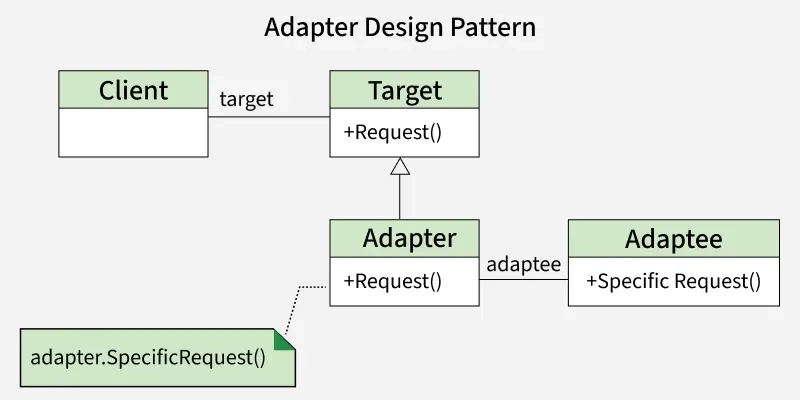
- Adapter Design Pattern is a structural pattern that acts as a bridge between two incompatible interfaces, allowing them to work together. It is especially useful for integrating legacy code or third-party libraries into a new system.
- Client wants to use a Target interface (it calls Request()).
- Adaptee already has useful functionality, but its method (SpecificRequest()) doesn’t match the Target interface.
- Adapter acts as a bridge: it implements the Target interface (Request()), but inside, it calls the Adaptee’s SpecificRequest().
- This allows the Client to use the Adaptee without changing its code.
Real World Examples:
- Software that uses different file formats (like CSV, JSON, XML) uses adapters to convert these into a format that the application can work with, facilitating data interoperability.
- Device Drivers in Operating Systems, Database Connectors and Language Converters (Chinese to English and English to Hindi) are more examples of adapters.
- In situations where we have a major change in new vs old APIs, instead of writing the whole old code again, we can use an adapter that does the conversion.
| Pros | Cons |
|---|---|
| Promotes code reuse without modification. | Adds complexity and can make code harder to follow. |
| Keeps classes focused on core logic by isolating adaptation. | Introduces slight performance overhead due to extra indirection. |
| Supports multiple interfaces through interchangeable adapters. | Multiple adapters increase maintenance effort. |
| Decouples system from implementations, easing modifications and swaps. | Risk of overuse for minor changes, leading to unnecessary complexity. |
| Handling many interfaces may require multiple adapters, complicating design. |
Uses Of Adapter Design Pattern
We can use adapter design pattern when:
- Enables communication between incompatible systems.
- Reuses existing code or libraries without rewriting.
- Simplifies integration of new components, keeping the system flexible.
- Centralizes compatibility changes, making maintenance easier and safer.
Limitations of Using the Adapter Design Pattern
Do not use adapter design pattern when:
- If the system is straightforward and all components are compatible, an adapter may be unnecessary.
- Adapters can introduce a slight overhead, which might be a concern in performance-sensitive environments.
- When there are no issues with interface compatibility, using an adapter can be redundant.
- For projects with a very short lifespan, the overhead of implementing an adapter might not be worth it.
Components of Adapter Design Pattern
Below are the components of adapter design pattern:
- Target Interface: The interface expected by the client, defining the operations it can use.
- Adaptee: The existing class with an incompatible interface that needs integration.
- Adapter: Implements the target interface and uses the adaptee internally, acting as a bridge.
- Client: Uses the target interface, unaware of the adapter or adaptee details.
Different implementations of Adapter Design Pattern
The Adapter Design Pattern can be applied in various ways depending on the programming language and the specific context. Here are the primary implementations:
1. Class Adapter (Inheritance-based)
- In this approach, the adapter class inherits from both the target interface (the one the client expects) and the adaptee (the existing class needing adaptation).
- Programming languages that allow multiple inheritance, like C++, are more likely to use this technique.
- However, in languages like Java and C#, which do not support multiple inheritance, this approach is less frequently used.
2. Object Adapter (Composition-based)
- The object adapter employs composition instead of inheritance. In this implementation, the adapter holds an instance of the adaptee and implements the target interface.
- This approach is more flexible as it allows a single adapter to work with multiple adaptees and does not require the complexities of inheritance.
- The object adapter is widely used in languages like Java and C#.
3. Two-way Adapter
- A two-way adapter can function as both a target and an adaptee, depending on which interface is being invoked.
- This type of adapter is particularly useful when two systems need to work together and require mutual adaptation.
4. Interface Adapter (Default Adapter)
- When only a few methods from an interface are necessary, an interface adapter can be employed.
- This is especially useful in cases where the interface contains many methods, and the adapter provides default implementations for those that are not needed.
- This approach is often seen in languages like Java, where abstract classes or default method implementations in interfaces simplify the implementation process.